

Players rarely think about the planning behind a smooth story moment or a tight action sequence, but developers feel it the second something doesn’t flow right. A scene doesn’t hit, pacing drifts, or two team members imagine the same moment in completely different ways. This usually happens when teams skip the planning stage and jump straight into production.
A clear storyboard keeps this from happening. It gives everyone a shared picture of how a moment in the game should look and feel. You can test pacing, check narrative logic, and catch problems long before they get expensive.
In this guide of Polydin Studio, you’ll see what storyboarding really is, how it’s used in game development, examples from well-known titles, and a simple way to build your own storyboard without overthinking it.
What Storyboarding Really Means in Game Development
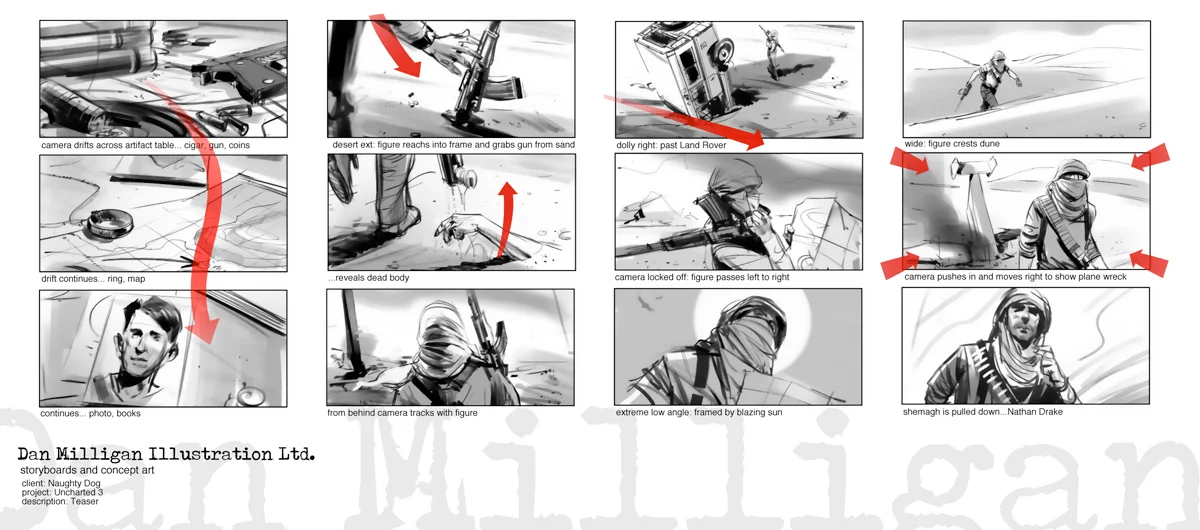
A storyboard is a sequence of rough frames that shows how a gameplay moment, cinematic, or interaction should play out. It doesn’t need polished art. It just needs to show the idea clearly enough for the team to understand it.
Why games need storyboards:
- They help avoid costly rewrites and reshoots.
- They keep designers, artists, programmers, and writers aligned.
- They support consistent narrative pacing.
- They make it easier to prototype player experience.
- They remove guesswork during implementation.
Most teams think they’ll “remember the idea later,” but they rarely do. A storyboard turns a half-formed thought into something the whole team can use.
How to Build a Game Storyboard (Practical Step-by-Step)
Define the vision
Before drawing anything, get clear on what the moment should feel like. Is it tense, calm, or surprising? A couple of simple sentences are enough. This small bit of clarity helps everyone think in the same direction and keeps the scene on track once production begins. You are not trying to write something fancy here. You are just giving the moment a purpose so the rest of the decisions make sense.
Identify the key moments
Think about the big beats that move the moment forward. The player enters, notices something off, interacts with an object, triggers an encounter. You do not need to capture every small step. The goal is to mark the moments that define the rhythm. These beats act like guideposts. Without them, a storyboard usually becomes unclear because no one knows which moments matter most.
Create visual frames
Turn those beats into quick sketches. Keep them fast and loose. Simple shapes, arrows, and stick figures are more than enough. What matters is that someone can glance at a frame and understand the action right away. Try not to get stuck on details or drawing quality. The moment you slow down to polish a frame, you lose time and focus. A clear sketch will always beat a pretty one that took too long to make.
Include gameplay mechanics
This is where game storyboards differ from film. Add short notes about what the player can do or what the game systems are doing. For example, the player presses a button, an enemy reacts to sound, or a UI prompt appears. These notes turn your storyboard into something the entire team can use. They connect the visuals to actual gameplay, which is the real purpose of the board.
Review as a team
Once you have a rough pass, walk the team through it. Talk about each frame. Ask if the pacing works or if anything feels confusing. People often spot issues the moment they hear the sequence described out loud. This step saves a lot of time because it exposes problems before anyone opens the engine. Note that Silence in a review usually means confusion. Ask people to walk through the sequence in their own words. If they can’t, your storyboard needs work.
A storyboard gets stronger every time someone new looks at it, so treat feedback as part of the process, not a final stage.

Common Mistakes to Avoid
Overcomplicating the board
A lot of developers try to make their storyboards look like finished concept art. This slows everything down and hides the actual purpose of the board. When frames get too detailed, people start worrying about anatomy, shading, or perspective instead of the scene’s logic. The goal is communication, not artistic polish. A readable stick figure usually works better than a perfect drawing that takes an hour to make.
Ignoring player perspective
Teams sometimes storyboard a moment the way a film director might stage a shot. That can be useful, but if it doesn’t match what the player actually sees in gameplay, the board becomes misleading. For example, a dramatic zoom or angle might look great on paper but is impossible in the game’s camera system. Always ask: “If I were holding the controller here, what would I see?” It saves you from designing moments that break immersion or simply cannot be implemented.
Skipping iteration
A common belief is that a storyboard should be right on the first try. It almost never is. Most good sequences come from revisiting the frames, adjusting pacing, adding missing beats, or realizing a moment doesn’t land emotionally. Teams that avoid iteration end up fixing those issues later in the engine, where changes cost far more time. Storyboards are meant to be messy, disposable, and flexible.
Forgetting technical reality
Sometimes a storyboard shows camera moves, effects, or character actions that the engine cannot support, or that would require more time than the project allows. This disconnect creates tension between creative ideas and technical constraints. When reviewing boards, have someone who understands implementation in the room. It’s easier to adjust a sketch than to rebuild a scripted sequence.
Lack of collaboration
A storyboard made alone often captures only one person’s understanding of the moment. But games combine design, animation, programming, audio, and game narrative design. If these groups don’t see the board early, each one makes assumptions that drift apart. The result is a scene that feels disconnected or requires unnecessary rework. Reviewing the board together is one of the simplest ways to keep everyone aligned.
When You Should Use Storyboarding
- Designing combat encounters or boss fights
- Planning puzzles or platforming rhythm
- Mapping exploration flow and transitions
- Blocking out camera moves
- Prototyping cutscenes and intros
- Teaching new gmae mechanics
- Communicating scenes to new team members
Overall, If a moment needs clarity, storyboarding helps.
Where Storyboarding Helps the Most
Storyboarding is useful across all types of game projects management. Big studios rely on it for complex cinematics, large encounters, and major narrative beats. Indie teams use it to stay aligned without endless back-and-forth, especially when building puzzles, tutorials, or emotional moments. Educational games benefit from clear planning, and mobile titles use storyboards to shape onboarding flows, UI transitions, and short gameplay loops. No matter the scale, any moment that needs clarity or reliable pacing becomes easier to build once it’s sketched out first.
Real Examples of Storyboarding in Games
The Last of Us
Many of the game’s emotional scenes were planned first in storyboard form. Camera framing, character blocking, and even the tension-building moments were tested in rough panels before moving to full cinematics.
Hollow Knight
Enemy patterns, boss intros, and environmental immersion storytelling often began as loose sketch panels. These boards helped the team maintain mood and rhythm before translating anything into gameplay.
Celeste
Platforming rhythm was carefully storyboarded. Rough frames helped the team test clarity, tension, and timing long before building the levels in-engine.
Bottom Line
Storyboarding works because it makes ideas visible long before they become assets, code, or fully built scenes. It gives teams a clearer sense of pacing, helps spot weak transitions, and keeps moments consistent with the game’s overall direction. Even a rough set of frames can prevent hours of confusion later. When scenes matter, taking a little time to sketch them out usually gives the project a smoother path forward.